
For care, community and trades businesses
Be ready the day the auditor calls.
Policies, staff sign-offs, training records and incidents — audit-ready in one place, calibrated to the standards you are held to.
14 days · every feature · no credit card
“When the auditor asks, we hand over the evidence then and there.”
Why now
The bar just moved.
Accorda keeps you in good standing.
On 1 July 2026, the NDIS Quality and Safeguards Commission began mandatory registration for supported independent living and platform providers — and the wider reform agenda raises the bar on the evidence every provider is expected to keep on hand.
Registration is expanding
SIL and platform providers moved to mandatory registration on 1 July 2026, with further support categories announced to follow. Registration means audits, Practice Standards and documented procedures — not a one-off form.
Evidence, not just documents
The expectation has shifted from “do you have a policy?” to “can you prove it was current, acknowledged and followed?” Audits increasingly turn on records that are dated, attributable and defensible.
Manual systems weren’t built for this
Policies in one drive, sign-offs in an inbox, incidents in a spreadsheet. When an auditor asks, the proof is scattered — and assembling it under pressure is where providers come unstuck.
Where Accorda fits: we're your compliance and incident system — policies, sign-offs, training records, incidents and audit evidence. It works alongside your claims, billing and rostering tools, not instead of them.
Source: NDIS Quality and Safeguards Commission — Mandatory registration. Reform timing and scope are subject to ongoing legislation; confirm specifics for your service with the Commission.
The reality
Right now, your evidence lives everywhere except where you need it.
Most providers aren't non-compliant on purpose. The proof is just scattered — and an audit is the worst time to discover the gaps.
Policies
Without a system: Live in a shared drive — nobody is sure which version is current.
With Accorda: One current version of every policy, with the full history kept behind it.
Sign-offs
Without a system: Buried in email threads and signed paper in a drawer.
With Accorda: Tracked automatically — you can see who has acknowledged what.
Incidents
Without a system: Logged in a spreadsheet, if they get logged at all.
With Accorda: Captured the moment they happen, with reportable ones flagged.
Audit day
Without a system: You lose a week assembling evidence by hand.
With Accorda: A complete, timestamped evidence pack in one click — any time.
Top of each card: how it usually works. Bottom: how it works with Accorda.
Free readiness check · about 4 minutes
Is your business audit ready?
Find out before the auditor does.
Answer 15 quick questions about your policies, people, incidents and evidence. Get an honest, practical report: your strengths, your gaps, and exactly what to do next — free, no account needed.
Tap to answer — no typing, no sales call.
Available for
Your readiness score
Illustration of a readiness report — yours is built from your own answers.
What you get
Everything that keeps you compliant — in one place, not seven.
Policies, always current
A single library with version control. The current policy is obvious; every prior version is kept for the record.
AI review, your standards
Accorda reviews your policies against the frameworks for your sector and flags gaps. It suggests — you decide.
Sign-offs that hold
Assign acknowledgements to staff and see who has signed, who hasn’t, and when — no chasing paper.
Training in one view
Current, expiring and overdue training across your whole team, without a separate spreadsheet to maintain.
Incidents, start to finish
Capture incidents as they happen, flag the reportable ones, and track corrective actions through to closure.
Complaints & risk registers
The registers the Practice Standards expect, with each entry tracked from raised through to closed.
Credentials & licences
Track staff credentials and licence expiry with automatic reminders, so nothing lapses unnoticed.
Works on a phone
Staff acknowledge policies and log incidents wherever they are — no app to install.
Evidence that stands up
Every record is timestamped and SHA-256 signed, so what you hand an auditor is provably unaltered.
Internal audit
Run the Practice Standards on yourself, in plain English, and turn findings into corrective actions.
Auditor access, on your terms
A read-only login for a set window. Every view is logged, and access closes automatically.
Regulatory Radar
Regulatory changes for your sector and state, drawn from official sources and linked to the policies they affect.
See it in action
Real screens from the actual product.
Not mockups. This is Accorda running a working allied health portal.
Cycling through — click any screen
Run the day
Prove it
Stay ahead
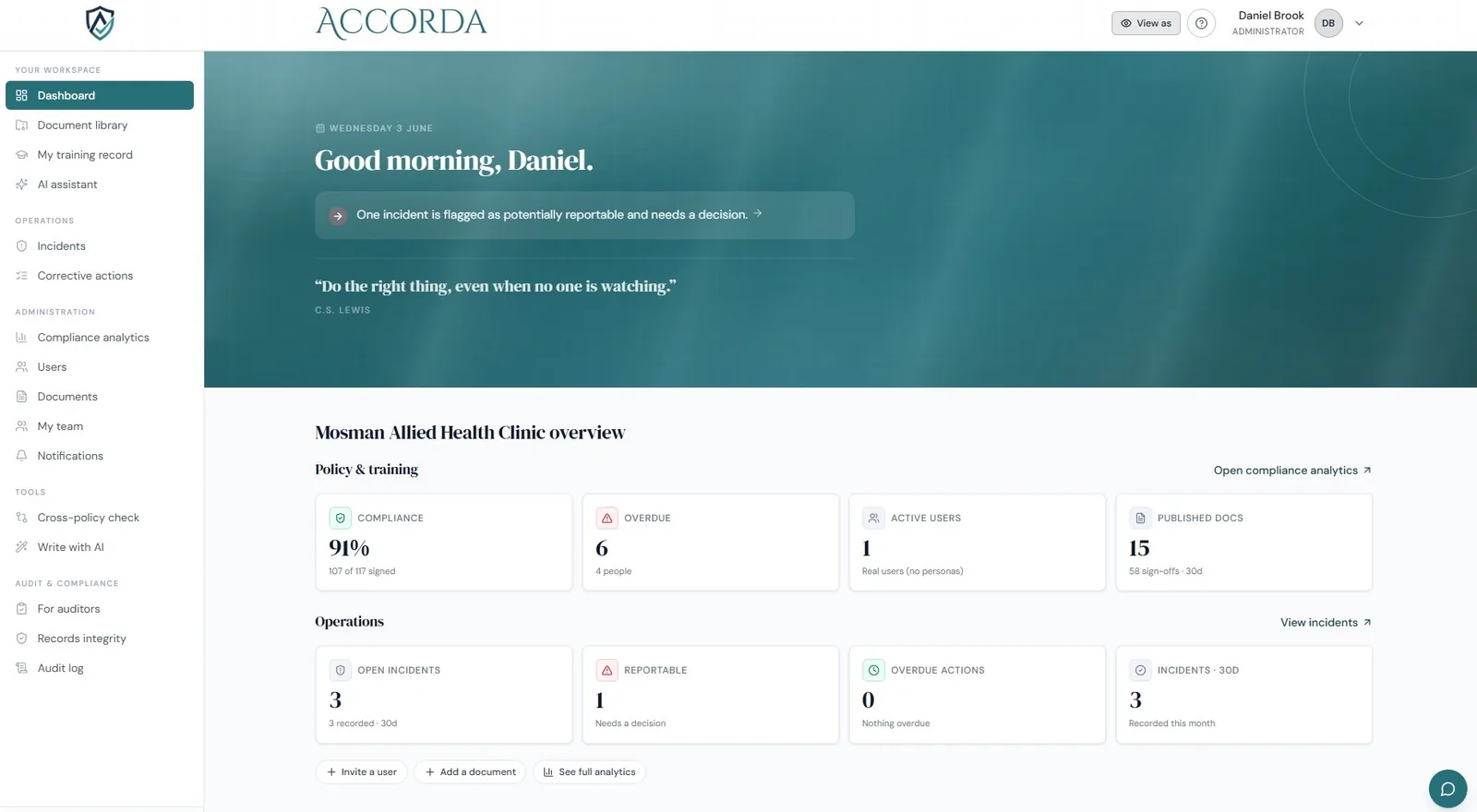
Your whole clinic at a glance
A live overview of compliance, training, incidents and what needs a decision today — the moment you log in.
Run the day · 1 of 11
Your whole clinic at a glance
A live overview of compliance, training, incidents and what needs a decision today — the moment you log in.
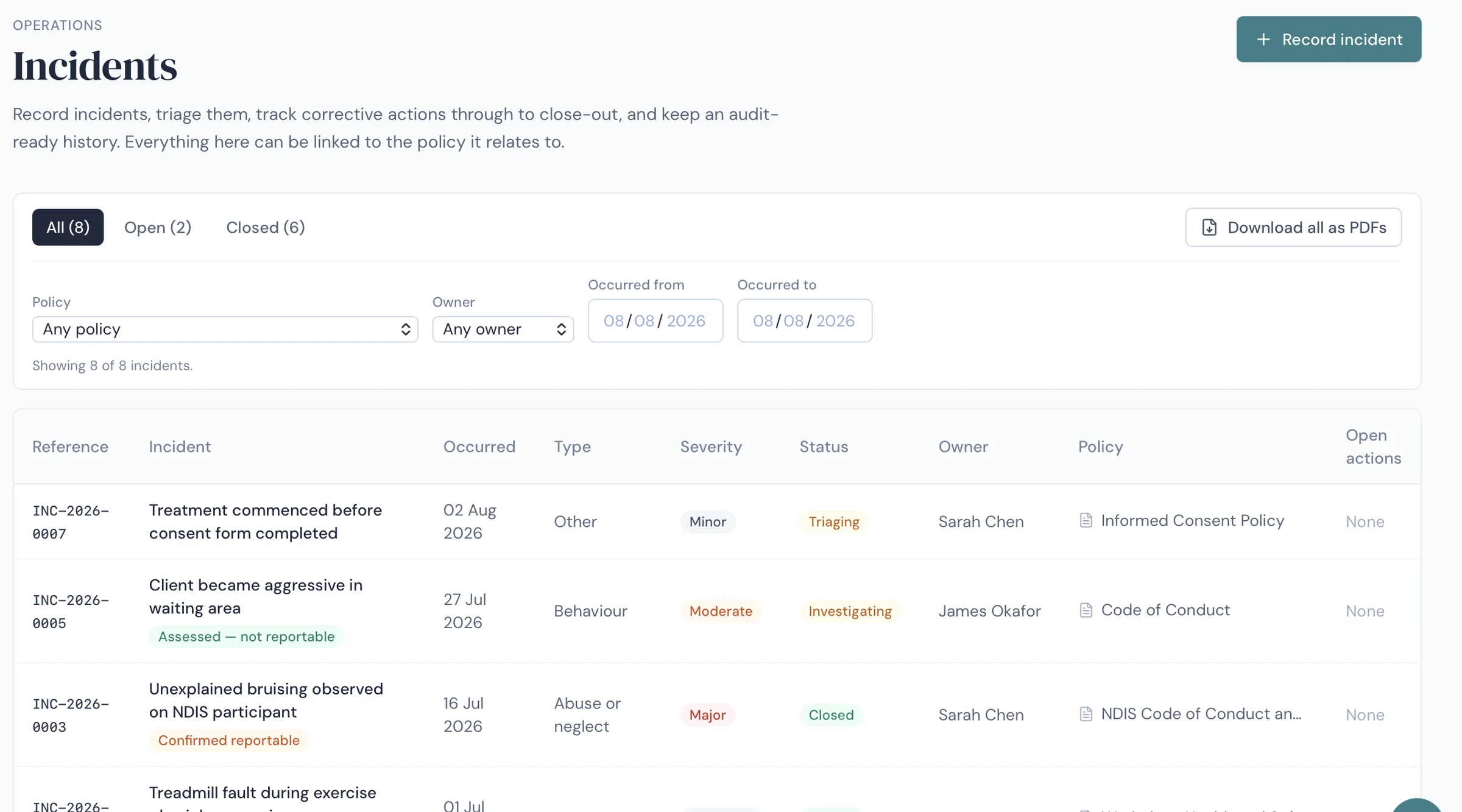
Run the day · 2 of 11
Every incident triaged, tracked and closed
Record an incident, decide whether it is reportable, assign corrective actions and track them to close-out — with each one linked to the policy it relates to.
Run the day · 3 of 11
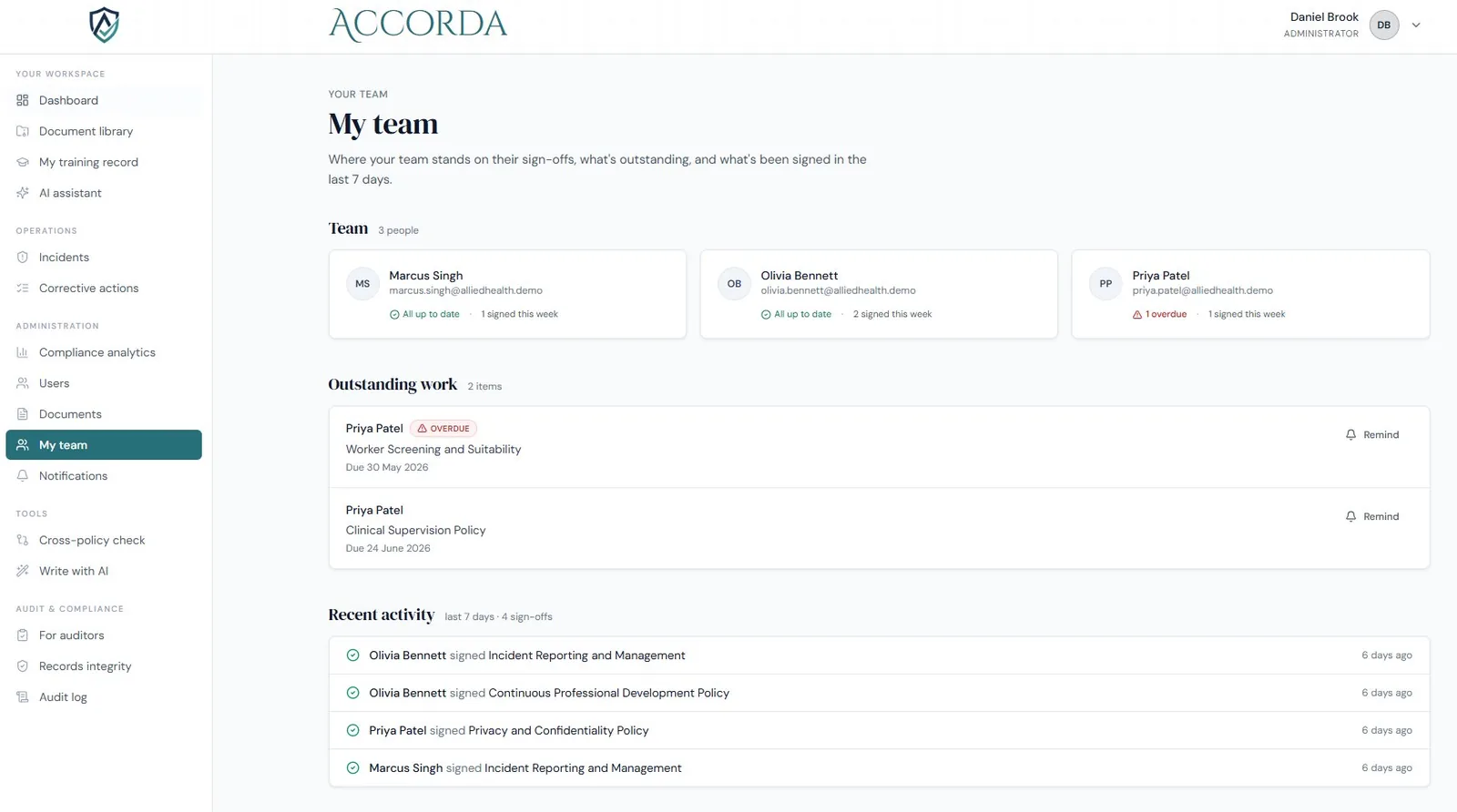
See where every sign-off stands
Who’s up to date, what’s outstanding, and what was signed this week — with a one-click reminder when someone falls behind.
Run the day · 4 of 11
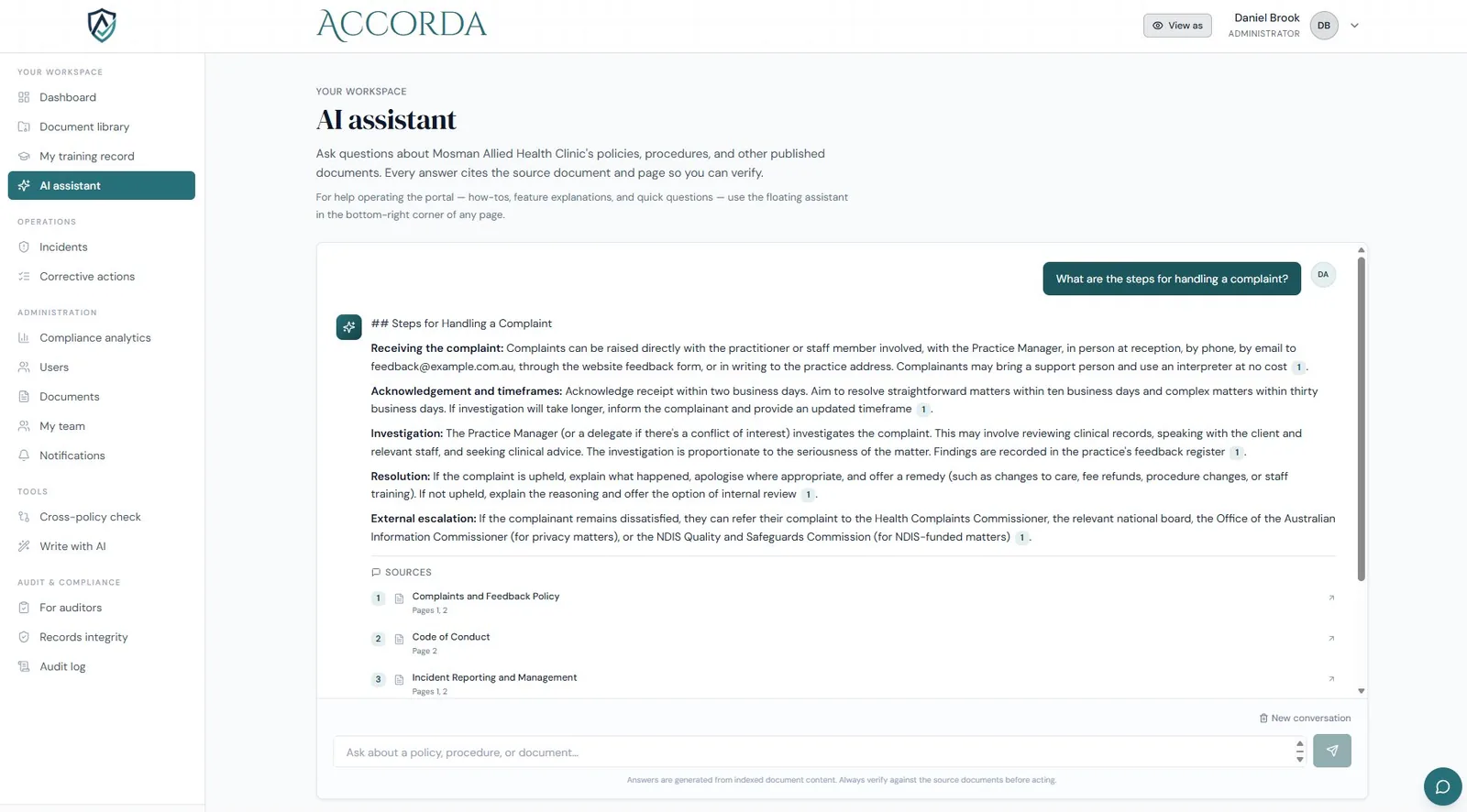
Answers, with the source attached
Ask about any policy or procedure and get a clear answer that cites the exact document and page — so you can verify, not just trust.
Prove it · 5 of 11
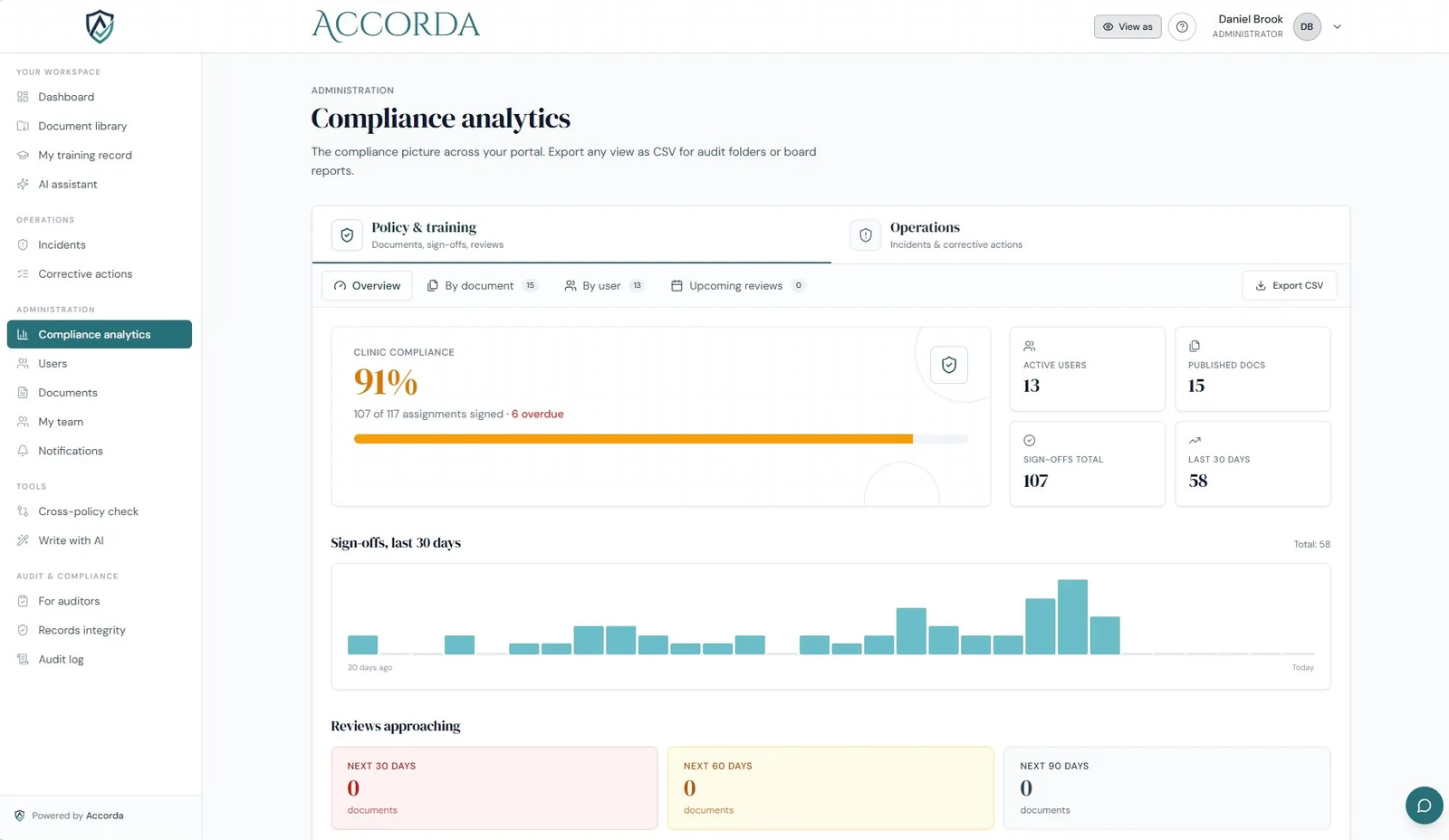
Know exactly where you stand
Sign-off rates, overdue items and upcoming reviews — and any view exports to CSV for your board pack or audit folder.
Prove it · 6 of 11
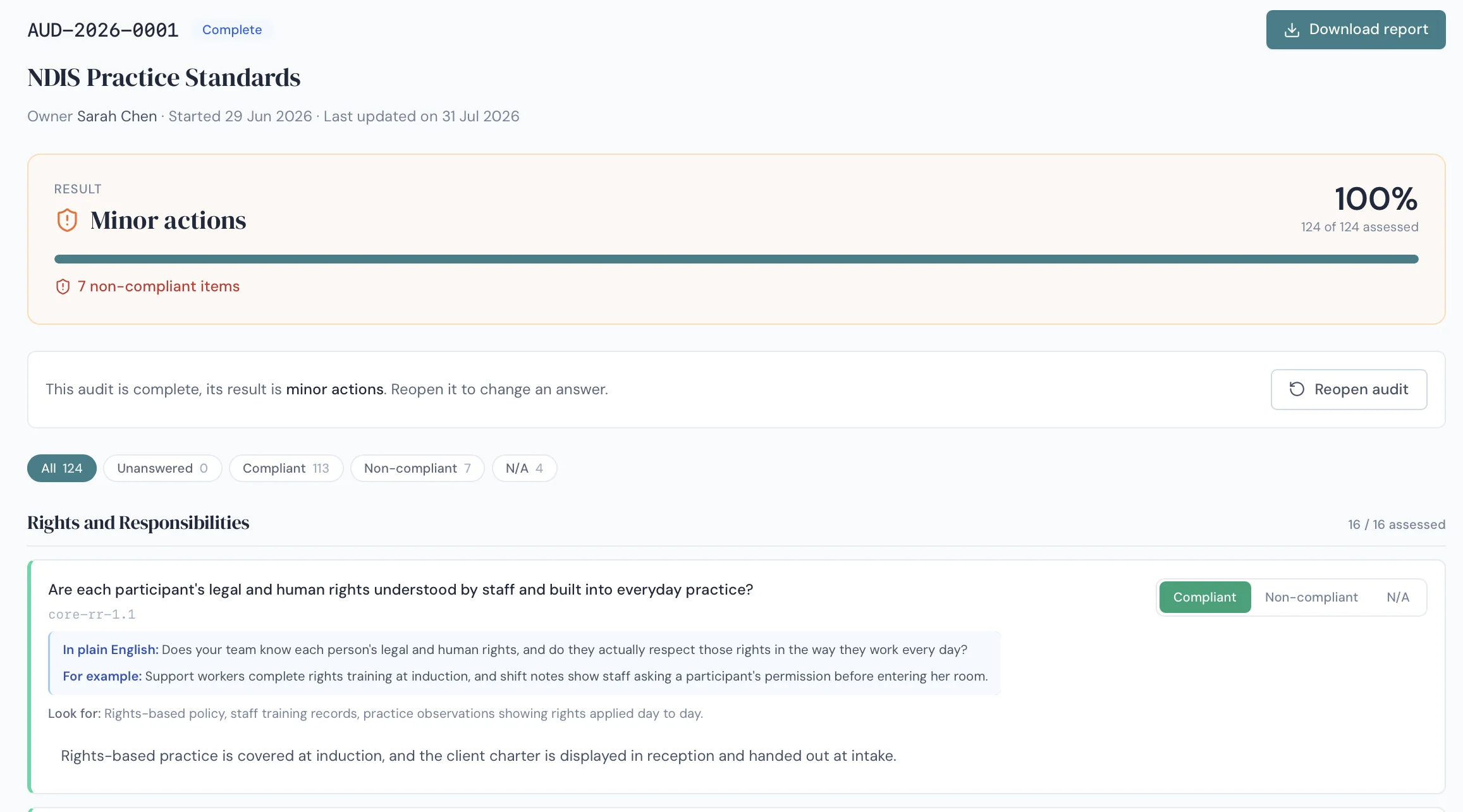
Run the audit on yourself first
Work through the Practice Standards question by question, in plain English, with the evidence to look for spelled out. Findings become corrective actions — so gaps surface before an auditor finds them.
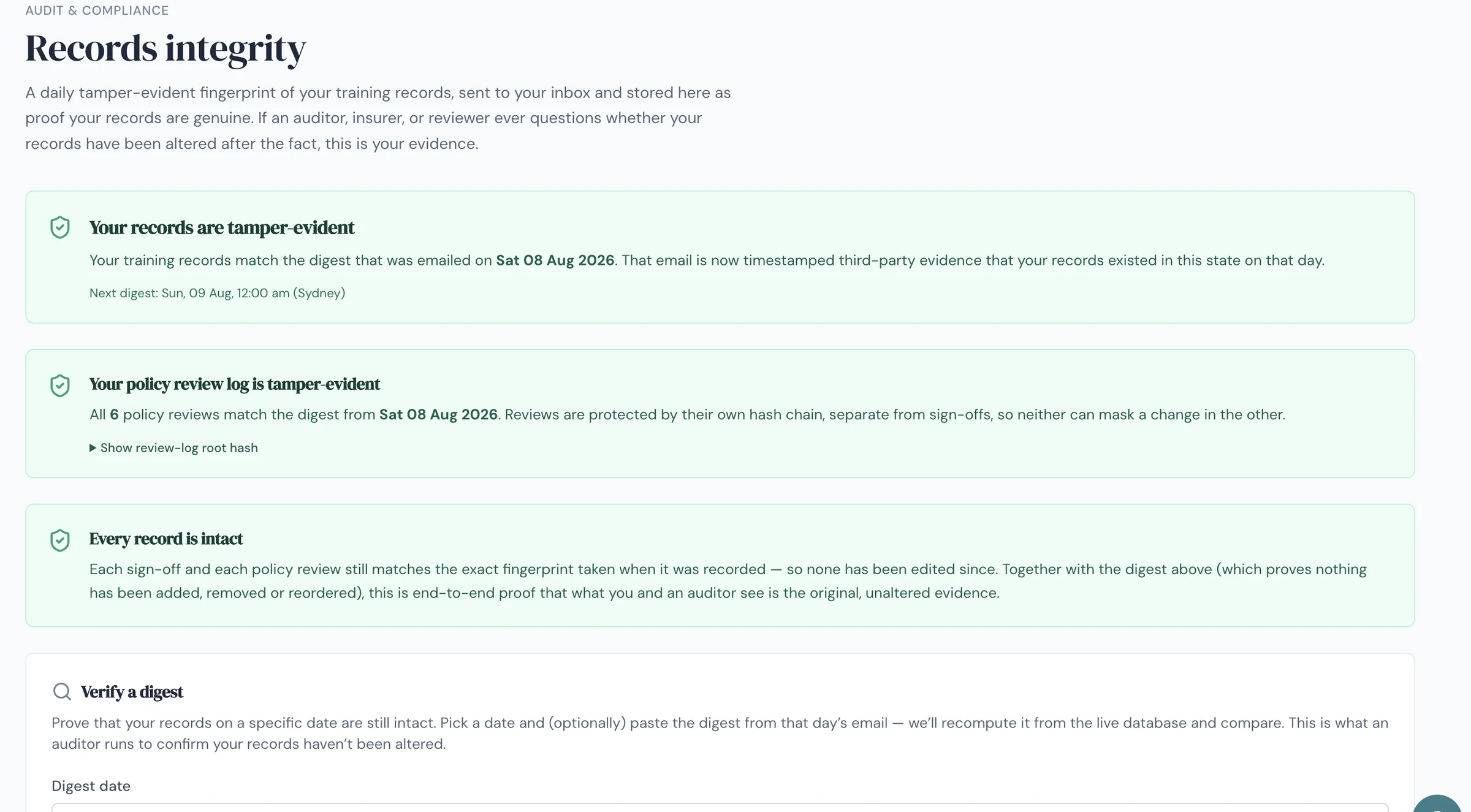
Prove it · 7 of 11
Proof your records were not altered
Every sign-off and policy review is hashed and chained, with a daily digest emailed to you as timestamped third-party evidence. Anyone — including your auditor — can verify a given day independently.
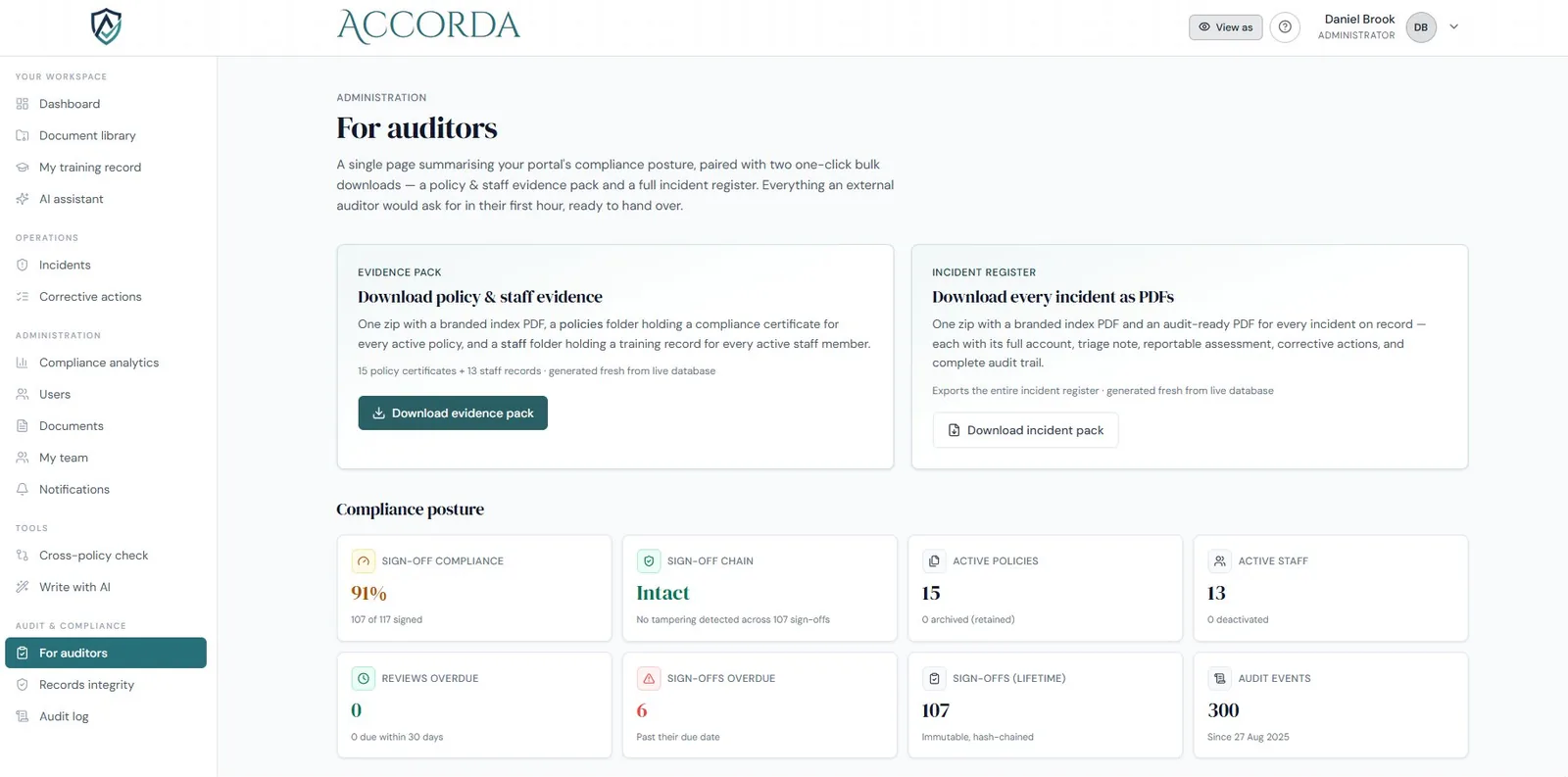
Prove it · 8 of 11
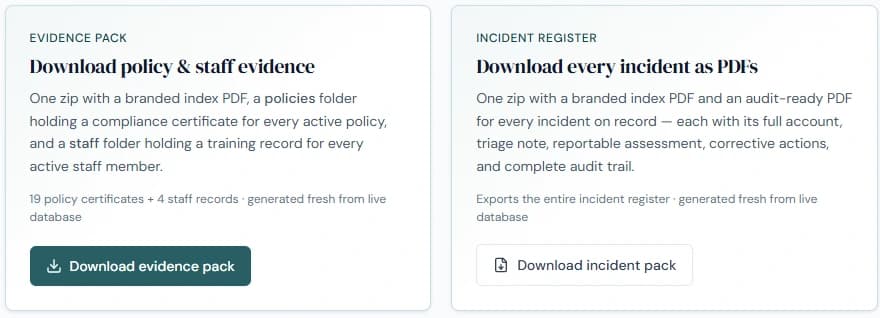
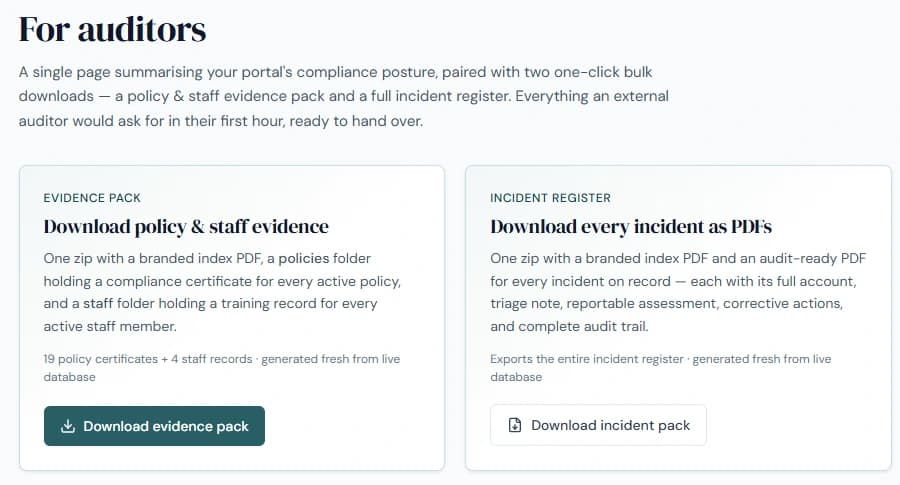
One page, two downloads, audit done
A full evidence pack and incident register, generated fresh from your live records — everything an auditor asks for in their first hour.
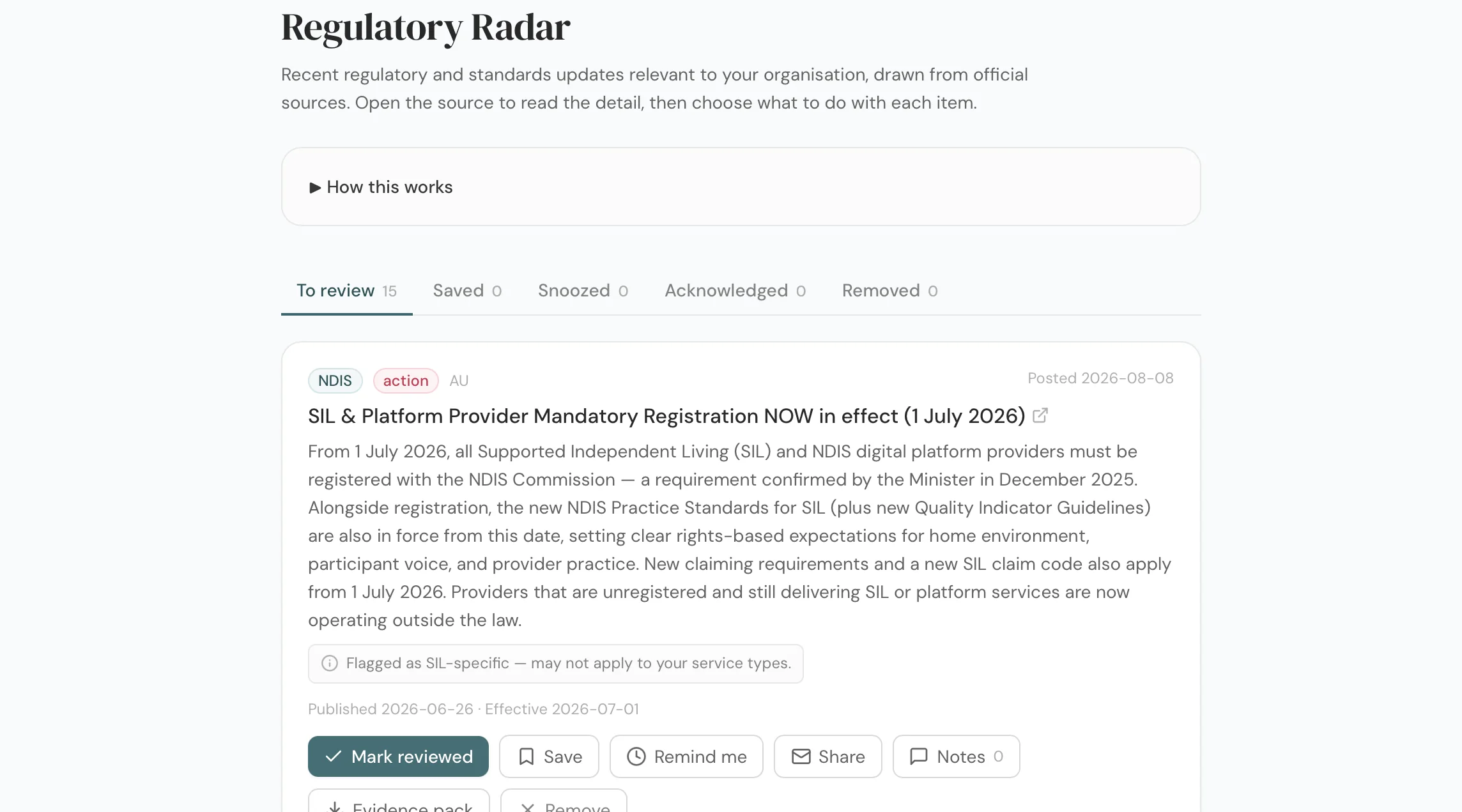
Stay ahead · 9 of 11
The rules change. You find out the same week.
Regulatory and standards updates for your sector, drawn from official sources, with the source linked and a plain-English read on whether it needs action. Mark each one reviewed and the decision is on the record.
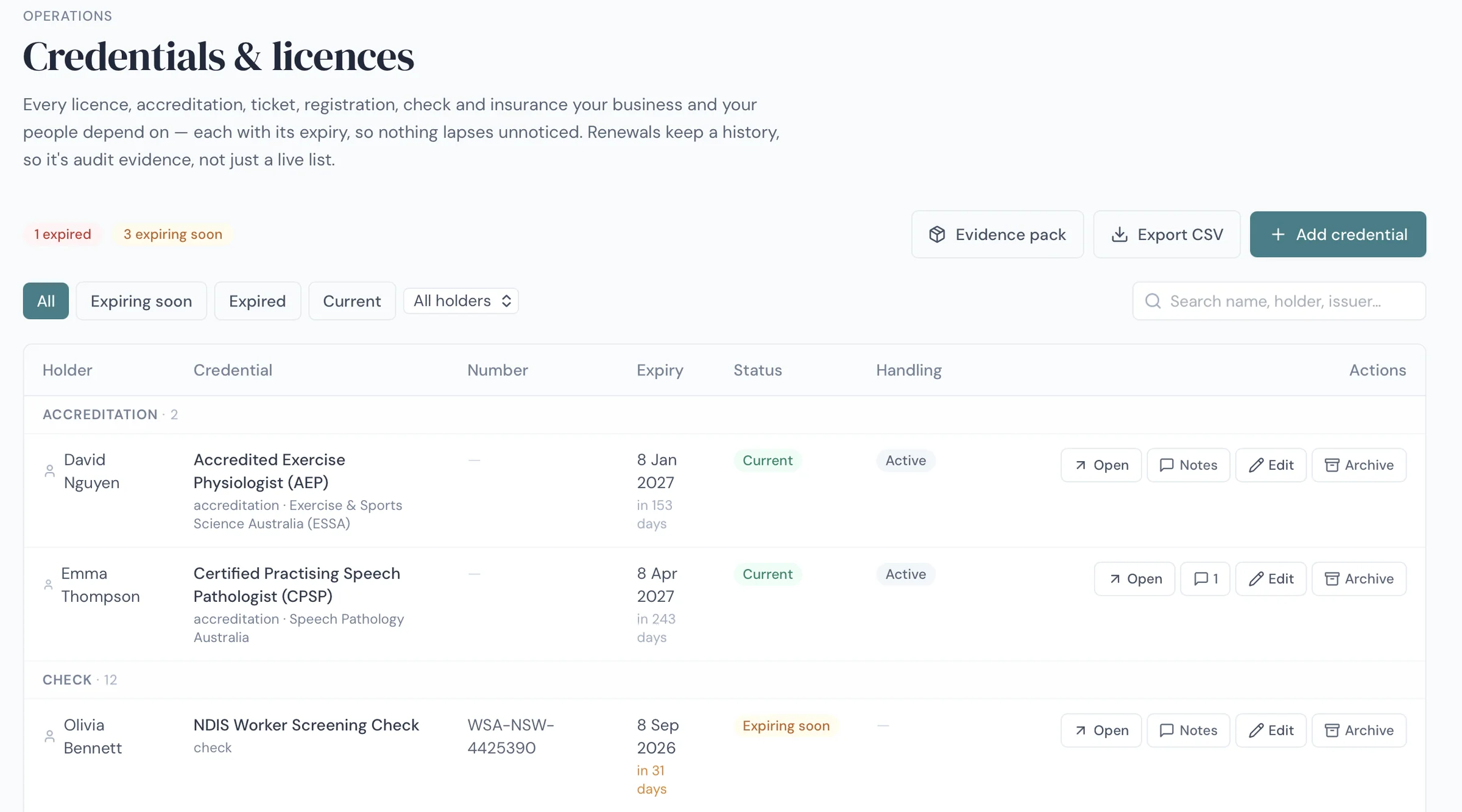
Stay ahead · 10 of 11
Nothing lapses unnoticed
Every licence, accreditation, ticket, registration, check and insurance your business depends on — each with its expiry and a reminder before it bites. Renewals keep a history, so it is audit evidence, not just a live list.
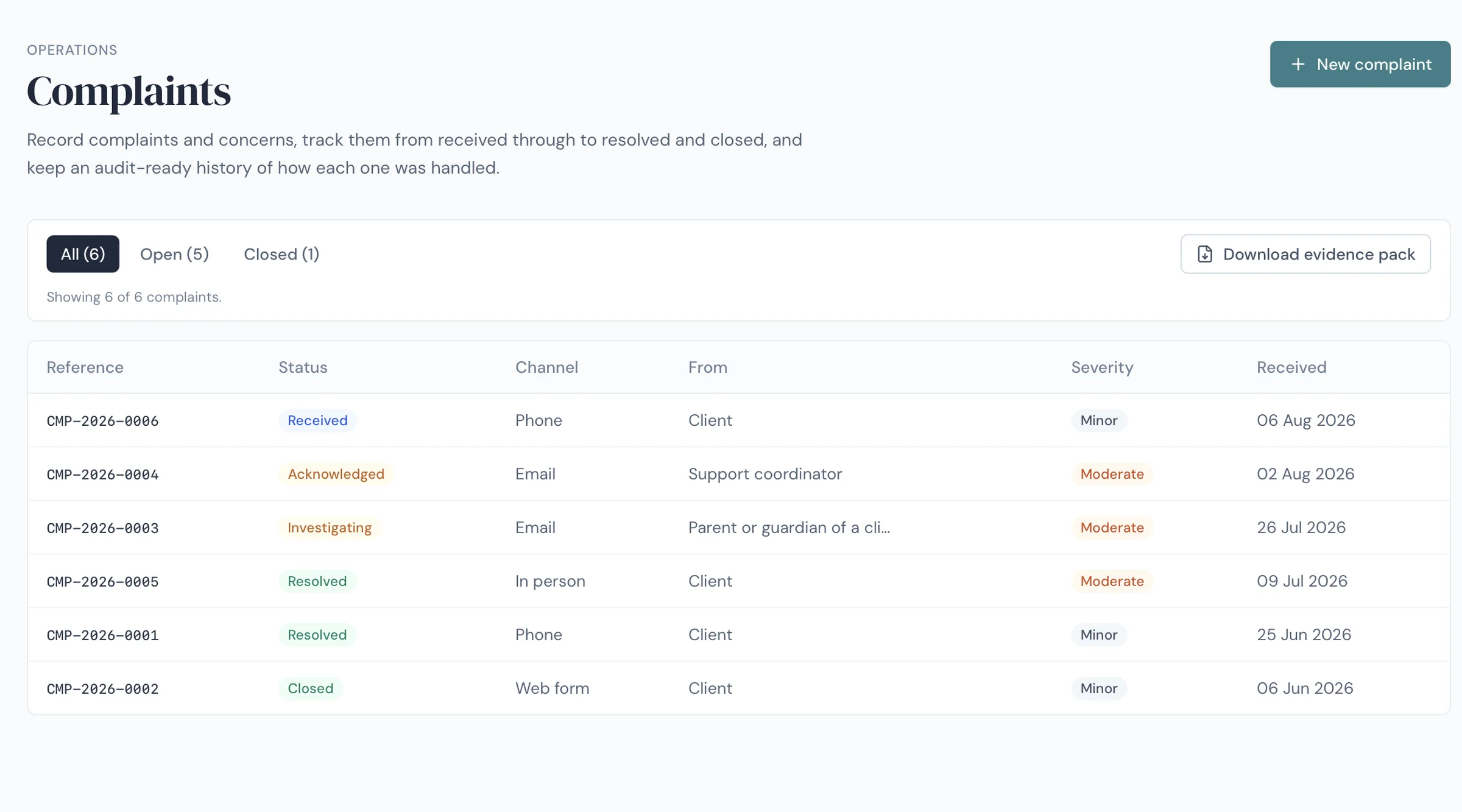
Stay ahead · 11 of 11
A complaints register that closes the loop
Record complaints and concerns, track them from received through to resolved and closed, and keep an audit-ready history of how each one was handled — a Practice Standards requirement, handled properly.
Swipe to see more screens →
Operations · Incidents
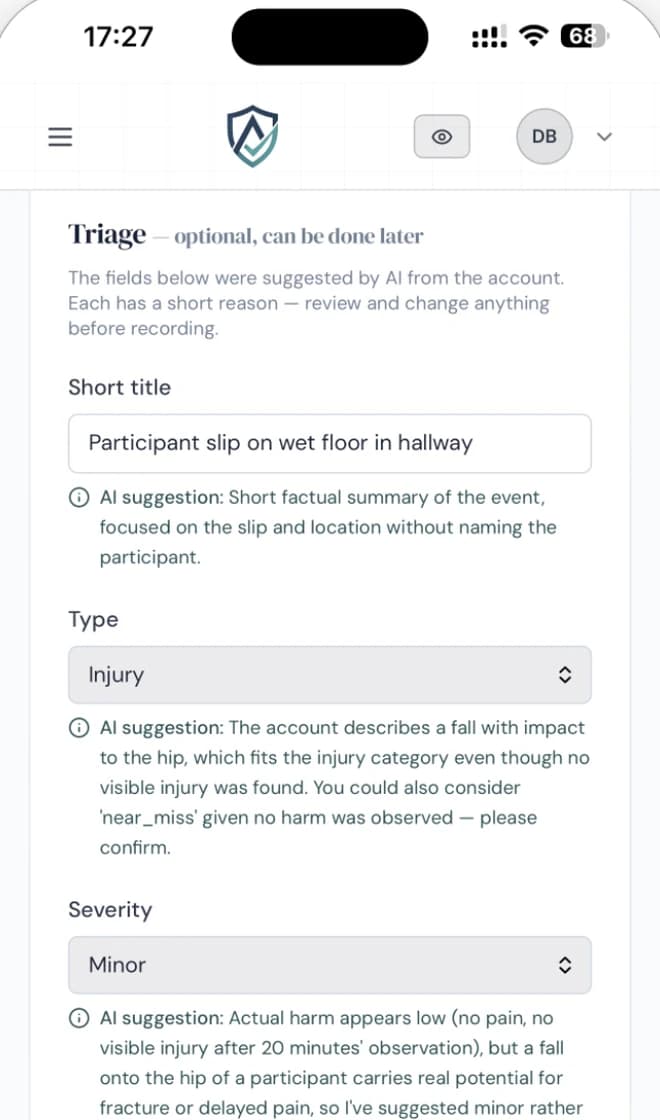
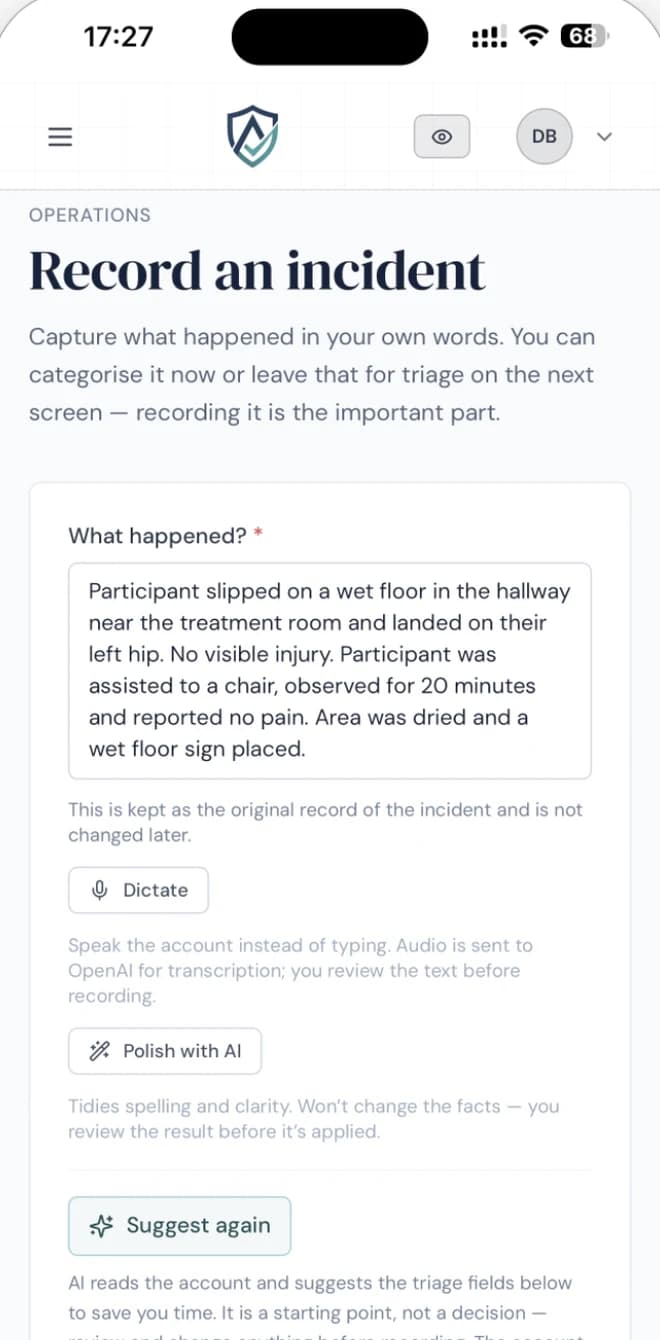
A support worker types what happened. Accorda works out what it means.
Plain words in the field — on a phone, straight after it happens. The portal reads the account and proposes the title, type, severity and the policy it touches, each with its reasoning attached.
What Accorda said about a slip in a hallway
“Actual harm appears low — no pain, no visible injury after 20 minutes’ observation — but a fall onto the hip of a participant carries real potential for fracture or delayed pain, so I’ve suggested minor rather than negligible. Consider raising if the participant is frail or high-risk.”
Suggested severity: Minor. Recorded with its reasoning, so anyone reviewing the incident later can see why.
Every suggestion carries a short reason, and nothing is recorded until a person reviews it. The original account is never altered.
When the auditor calls
Your whole
evidence pack.
One click.
Apply any filters you need — or none at all — and Accorda assembles your current policies, sign-off records, training, incident history, corrective actions and user records into a single, timestamped pack. Every page SHA-256 signed and independently verifiable.
- Ready to hand over as a PDF or ZIP
- Provably unaltered — verify any record against its hash
- Or give your auditor their own time-limited, read-only access
- No scrambling, no all-nighters, no gaps you discover too late
Pack contents
How it works
Set up in an afternoon, not a quarter.
No implementation project, no consultant, no migration to schedule. Accorda walks you through five short steps the first time you sign in, and tells you roughly how long each one takes.
01
Bring your policies in
Drag and drop the policies you already have — as many at once as you like. Accorda checks each file, turns the filename into an editable title, and you set who can see it before anything is published.
02
Paste in your team
Copy the columns straight out of your staff spreadsheet and paste them in. Accorda reads the names, emails and roles, skips your header row, and sends every invite at once.
03
Say who signs what
Assign policies to the people who need them. From there the evidence builds itself as your team works, and your audit pack is one click away whenever you need it.
The whole guided setup is about sixteen minutes — and you do not have to do it in one sitting. Accorda remembers where you stopped, shows you what is left, and lets you skip anything you would rather come back to.
“Audit prep used to mean days of digging through drives and inboxes for the right policy version and sign-offs. Now it’s all in one place and always current — when the auditor asks, we hand over the evidence then and there.”
Vital Motion Allied Health is a working Sydney NDIS clinic that shapes what we build, week to week. Accorda is owner-operated, Australian, and here for the long run.
Pricing
Every plan is the full platform.
Every plan includes every feature, no surprise add-ons. Plans differ by team size — every provider gets the complete system. All prices in AUD per month.
Solo
1 user
Single user, no extra seats
Start free trial- Full Accorda platform
- Policies, sign-offs, training & incidents
- AI review & one-click audit packs
- SHA-256 evidence & full version history
- Email support
Basic
Up to 10 users
+$16 / extra user
Start free trial- Full Accorda platform
- Policies, sign-offs, training & incidents
- AI review & one-click audit packs
- SHA-256 evidence & full version history
- Email support
Standard
Up to 25 users
+$15 / extra user
Start free trial- Full Accorda platform
- Policies, sign-offs, training & incidents
- AI review & one-click audit packs
- SHA-256 evidence & full version history
- Priority support
Pro
Up to 75 users
+$12 / extra user
Start free trial- Full Accorda platform
- Policies, sign-offs, training & incidents
- AI review & one-click audit packs
- SHA-256 evidence & full version history
- Priority support + onboarding session
Want a hand getting set up?
Optional white-glove setup ($499 one-off): we configure your policies, team and frameworks for you. Most providers are fine self-serve — it's there if you'd rather we did the heavy lifting.
New accounts can start with a 14-day free trial — every feature, no credit card — or subscribe straight away. Pricing questions answered →
Trust & security
Your data, your evidence, your call.
Compliance software only works if you can trust where your records live and who can reach them. Here's where we stand.
Hosted in Australia
Your data stays onshore, in Australian infrastructure.
Isolated, with MFA
Row-level security keeps every provider’s data separated and private, and admin logins are protected with enforced multi-factor authentication.
Tamper-evident records
SHA-256 hash chains with a public verifier, plus a tamper-evident digest emailed nightly as independent proof your records are unaltered.
Export anytime
Your records are yours. Export your data whenever you like — no lock-in.
AI suggests, humans decide
Accorda flags and drafts; your team approves. It never makes the call for you.
You control who sees what
Per-feature access for managers and staff, set by you — and every auditor view is logged.
Free tool for NDIS providers
Free to use, with no account and nothing to install. It is separate from the platform above — a calculator, built on the same rule that runs through everything else here: the records have to agree with each other.
An auditor asks what you charged, and why.
That answer was written months earlier, in a spreadsheet.
Costing a plan looks like admin, and it is not. The price charged, the support item it is claimed against and the agreement the participant signed all have to say the same thing — and getting from a plan total to a costed schedule is arithmetic, done against price limits that are published, revised, and easy to be a year behind on.
One pool, the whole plan period
A plan is a fixed amount of money that has to cover every support a participant needs and last the whole time the plan runs. Commit too much early and the supports stop before the end date. Commit too little and the funding lapses unspent. The first of those is not only a budgeting error: it is a participant without the supports their agreement describes, and a question the provider gets asked.
Last year’s sheet is quietly wrong
What a support may be charged at is published in the NDIS Pricing Arrangements and Price Limits, and that document is revised. A sheet built against an earlier edition still adds up perfectly. It has simply stopped describing what you can claim — and a charge worked out from it is a pricing problem, not a spreadsheet one.
Every assumption feeds the total
Allocating hours across disciplines is multiplication, and the inputs move. Change the block length, the region, the mix of disciplines or when service actually starts, and the totals have to be worked out again from the top. What comes out is usually what the service agreement is written from, so a figure redone in one place and not the other leaves two documents disagreeing.
The spreadsheet drifts from the schedule
The working-out usually sits in a file someone built once and has patched since. Copies travel by email, formulas outlive the prices underneath them, and the version a coordinator opens is rarely the version that was last corrected. Asked months later how a figure was arrived at, you are looking for a file rather than holding a record.
What it costs to get wrong: a participant left without funded supports partway through the plan, or a charge that no longer matches the published limit. Neither arrives on the day as a spreadsheet error. Both were settled months earlier, in a spreadsheet, by someone doing sums between appointments.
Free NDIS funding planner · no account needed
What will this plan actually buy?
Work it out before you commit the hours.
Split an NDIS plan into funding blocks, allocate supports against each block at the published price limits, and read the totals back — per block, per discipline, and against what is still to place. Take the result away as a spreadsheet or a one-page summary, so the working behind a figure is a document rather than a memory.
Free, and it runs in your browser — your draft is kept on this device. Read the guide to see what it covers first.
What we see: the words you type — the plan label, the block descriptions, anything you write about a person — stay in this browser. What reaches us is how far visitors get and how large a plan is: its totals, its block and discipline counts. The downloads ask for an email address, and the panel there sets out both requests field by field.
Plan A · 3 blocks
$36,000Illustration of a block summary — yours is built from your own figures, priced from the published catalogue.
FAQ
Straight answers.
What can I do in Accorda?
Accorda brings your compliance work into one place: a versioned policy library, staff policy sign-offs, training records, staff credential and licence tracking with expiry reminders, incident and reportable-incident management with corrective actions, complaints and risk registers, internal audits against the Practice Standards, one-click audit evidence packs, and Regulatory Radar — a curated feed of the regulatory changes that affect you. AI helps review and draft — your team makes every decision.
How does Accorda help me get audit-ready?
Instead of scrambling when an auditor calls, the evidence builds itself as your team works — every policy version, sign-off, training record and incident is captured and timestamped. When you need it, you generate a complete, SHA-256-signed evidence pack in one click.
Can I bring our existing policies in?
Yes. Drag and drop the policies you already have — as many at once as you like — and Accorda checks each file, sets an editable title, and asks who should see it. From there the AI reviews them against the frameworks for your sector and flags the gaps. Most teams are up and running in an afternoon.
How does the AI policy review work?
Accorda reviews each policy against the standards that apply to you, flags gaps, suggests improvements, and can draft updates for you to consider. It suggests; you approve. Nothing changes without a person signing off — the AI never makes the call for you.
How do staff sign-offs and training tracking work?
Assign a policy or training item to your team and Accorda tracks who has acknowledged what, and when. You see current, expiring and overdue items at a glance — no chasing paper, and no separate spreadsheet to maintain. Staff credentials and licences are tracked the same way, with reminders before anything expires.
What is Regulatory Radar?
Regulatory Radar is a curated feed of regulatory changes relevant to your sector and state, drawn from official sources like the NDIS Commission and ACECQA. Each update is linked to its source and checked against your own policies, so you can see what changed and which of your policies it affects — without watching the regulators yourself.
Can I run an internal audit before the real one?
Yes. Internal audit walks you through the Practice Standards question by question, in plain English, with the evidence to look for spelled out. Anything you mark non-compliant becomes a corrective action you can track to close-out — so gaps surface on your terms, not the auditor’s.
Does Accorda handle complaints and risk registers?
Yes, both are built in. Complaints are tracked from received through to resolved and closed, with an audit-ready history of how each one was handled, and the risk register works the same way — the registers the Practice Standards expect, kept properly.
What’s in the one-click audit pack?
Apply any filters you need and Accorda assembles your current policies (and their history), sign-off records, training status, and incident history with corrective actions into a single timestamped pack — exportable as PDF or ZIP, with every page SHA-256 signed and independently verifiable.
How quickly can we be up and running?
An afternoon, not a quarter. Accorda walks you through five short steps the first time you sign in — about sixteen minutes of guided setup in total, and you can stop and come back to it. Drag in the policies you already have, paste your team straight out of a spreadsheet, and say who signs what. If you’d rather we set it up for you, optional white-glove setup is available.
Does Accorda work on mobile?
Yes. Accorda runs in the browser and works on phones and tablets, so staff can acknowledge policies and log incidents wherever they are.
What happens after the free trial?
The trial runs 14 days with full features and no credit card. The AI tools have fair daily limits — policy reviews, AI authoring and the cross-policy check each have their own daily allowance — which is plenty for evaluating the product. If you don’t continue, your account becomes read-only — your records aren’t deleted — and you can choose a plan whenever you’re ready.
Where is my data hosted, and is it secure?
Your data is hosted in Australia, isolated per tenant with row-level security, and every record is SHA-256 signed so it’s provably unaltered. You can export your data at any time — no lock-in.
Which sectors does Accorda support?
NDIS first, with the same system fitting aged care, allied health, medical, dental, childcare, trades, and broader health and community services. Accorda calibrates to the frameworks that apply to you.
Does Accorda handle NDIS claims, billing or rostering?
No — and we’d rather be upfront. Accorda is your compliance and incident system: policies, sign-offs, training, incidents and audit evidence. It works alongside your claims, billing and rostering tools, not instead of them.
Do I need to be registered with the NDIS to use Accorda?
No. Accorda is useful while you’re preparing for registration and for staying audit-ready once you’re registered. For advice specific to your situation, check with the NDIS Commission.
Compliance in good standing
Walk into your next audit ready.
Bring your policies, sign-offs, training and incidents into one place — and stop dreading the day the auditor calls.
14 days · every feature · no credit card
A
SHA-256
Every record, sealed