
Feature · Groups
Set the rule once per group. Membership does the rest.
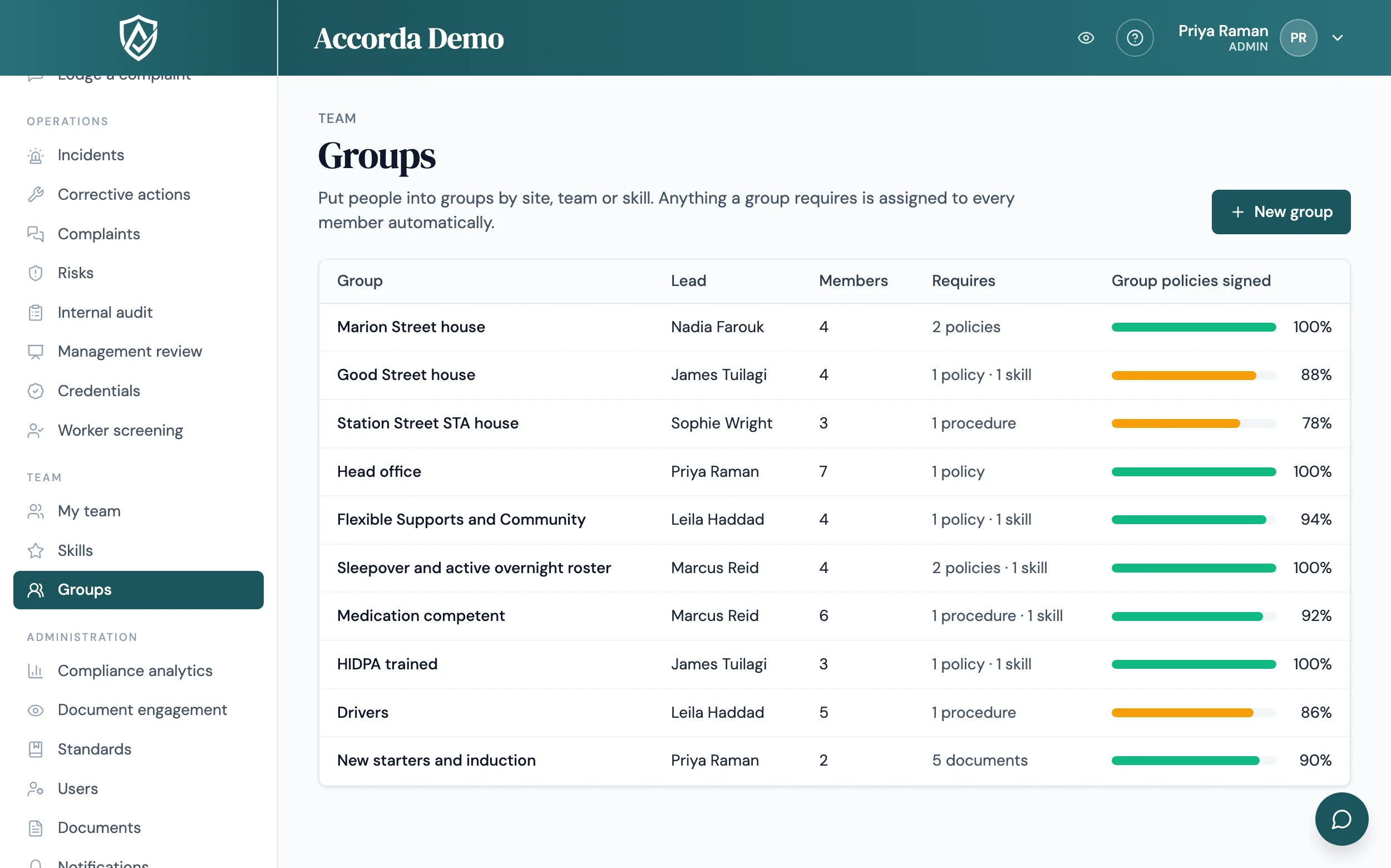
Put people into groups by site, house, team, skill or role, and tell Accorda what each group must read, sign and hold. When someone joins, they are asked to sign. When a new version is published, the right people are asked again.
14 days, every feature, no credit card.
Built for providers with more than one site
Assigning policies person by person works for a small team. It breaks down across several houses, clinics or crews, where each site has its own procedures, people move between teams and new starters arrive every month. Groups let you describe the rule once, for example "everyone at this house signs these six procedures", and Accorda applies it to whoever is in the group, now and later.
A group can require documents, with a number of days to sign, and skills. Before anything is saved, a preview shows exactly who will be asked to sign what, and who is skipped and why.
What happens automatically
Once a group has its requirements, membership does the work.
- Someone joins a group: they are asked to sign everything the group requires, straight away
- A new version of a required document is published: everyone in every group that requires it is asked to sign the new version
- Someone leaves a group: they lose only unsigned items that came from that group alone, and you see exactly what will go before you confirm. Signed records are always kept
- Two groups requiring the same policy make one assignment, not two
Group leads and compliance by group
Each group can have a lead, an admin or manager who sees how the group is tracking on their dashboard. Each group page shows the share of group policies signed and a compliance list of every member: signed, overdue and last signed. On a document's page, each person is shown as assigned directly or via a group, so you can see why someone was asked.
Compliance analytics and skills coverage have a group filter, which is how you look at one site or team, and every list exports to CSV. When groups exist, the evidence pack and the management review include a summary by group.
Access for one person, on top of their role
Roles set what most people can do. Sometimes one person needs a little more or a little less: a team leader who can see complaints but not run them, or a support worker who can view the risk register. An admin can allow or block single features for one manager or staff member without changing the role for everyone. Each change saves straight away, the person is marked with a Custom access badge, and every change is recorded in the audit log.
Per-person choices change what someone sees and can do in Accorda. Underneath, records are still protected by role (admin, manager or staff), so where you need strict separation between people, set it with roles.
Getting people into groups
Add people from the group page, from the Users list, when you invite someone, or in the team list during setup. Groups are off until an admin switches them on in Workspace settings. Switching them off later keeps the groups, their members and everything already assigned.
Guides
Plain-English answers to the questions behind this page.
FAQ
Straight answers.
What can a group be based on?
Whatever decides what people need to read and sign: a site, a house, a team, a shift, a skill or a role. A person can belong to several groups.
What happens to signed records when someone changes teams?
They are kept. Leaving a group only removes unsigned items that came from that group alone, and Accorda shows exactly what will go before you confirm.
Do new versions of a policy go to the whole group?
Yes. When a new version of a document a group requires is published, everyone in that group is asked to sign it.
Can a site manager see how their own group is going?
Yes. A manager who leads a group can always open that group's page, and their dashboard shows each group they lead with its sign-off figure and overdue items. Admins see every group.
Can one person have different access from others in the same role?
Yes. An admin can allow or block single features for one manager or staff member. Managing users, workspace settings and billing always stay with admins.
Related
Start today
Walk into your next audit ready.
Try Accorda free for 14 days. Every feature, no credit card.