
Feature · Policy quizzes
A signature says they clicked. A quiz shows they understood.
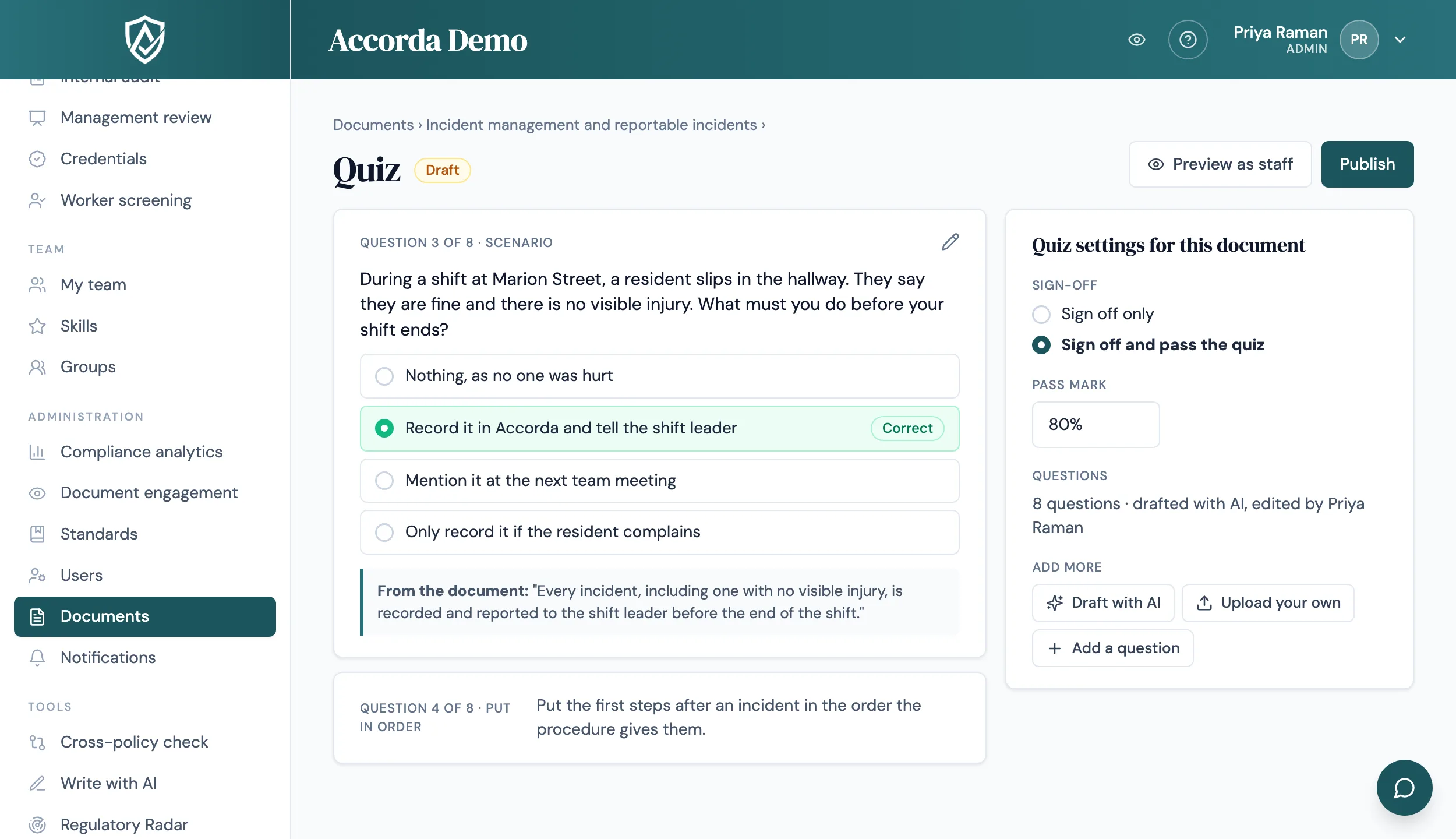
Add a short quiz to any policy or procedure, optional or required before sign-off. Accorda drafts the questions from the document itself, you check them and publish, and the results show where your team needs more training.
14 days, every feature, no credit card.
Why a sign-off is not enough on its own
A sign-off records that someone opened a document and confirmed they read it. It cannot tell you whether the incident reporting steps or the medication procedure actually landed. A short quiz on the same page closes that gap: staff read, answer a few questions, then sign, and the record shows both.
Quizzes sit on the document, not in a separate training system. Whoever is asked to sign the document takes its quiz on the same page, so there is nothing extra to assign or chase.
Three ways to make a quiz
Start from whichever suits the document. An AI draft is always a draft: you edit, reorder or delete questions, preview the quiz as staff will see it, and publish when you are happy.
- Draft with AI: choose up to 10, 15 or 20 questions. Every question shows the line of the document its answer comes from, and questions the document does not support are dropped
- Upload your own: fill in the Excel template, one question per row, and Accorda lists any problem rows before anything is saved (up to 100 questions)
- Write your own: start an empty quiz and add questions by hand
- Question types: one answer, tick all that apply, true or false, scenario, and put in order
Optional, or required before sign-off
For each document you choose Sign off only, where the quiz is an optional self-check, or Sign off and pass the quiz, where staff must pass before they can sign. When a pass is required, staff see three steps on the document: read, quiz, sign. Accorda itself refuses a sign-off without a pass, not just the screen, so the record always holds up.
- Pass mark from 50% to 100%, with 80% as the default
- Unlimited retakes, or a limit from 1 to 10, with the question order shuffled
- Show the correct answers after each question, at the end, or never
Results that still match the questions later
A published quiz is locked, so results always match the questions people actually answered. To change it you start a new version, and when you publish you choose: a small correction, such as a typo, keeps everyone's results; a real change asks everyone to take the new version.
Results appear on each person's training record and certificate, on the document's compliance certificate, in the audit evidence pack and in the management review. Auditors see results, never the answers.
See where training could help
Compliance analytics has a Quizzes tab with the pass rate, average best score and attempts per pass for each quiz, which you can filter by group to look at one site or team.
- Where training could help: flags a section of a document when many first-time takers miss its questions
- Questions most often answered wrong: the trickiest questions, without revealing the right answer
- Who still has to pass each quiz, with every list exportable to CSV
Guides
Plain-English answers to the questions behind this page.
FAQ
Straight answers.
Will the AI write questions that are not in our policy?
It is built not to. Every AI question carries the exact words of the document its answer rests on, and a separate check drops any question the document does not support. You still review every question before you publish.
Can we use our own questions?
Yes. Download the Excel template, write one question per row and upload it, or write questions by hand in Accorda. Uploads are checked row by row, and nothing is saved until every row is right.
Can staff sign a policy without passing the quiz?
Only if you let them. Set the document to Sign off and pass the quiz and Accorda refuses a sign-off without a pass. Set it to Sign off only and the quiz is an optional self-check.
What happens if we fix a mistake in a published quiz?
You start a new version. When you publish it, choose Small correction to keep everyone's results, or Real change when the content has changed and everyone should take it again.
What does an auditor see?
Quiz results on training records and certificates, in compliance analytics and in the evidence pack. Auditors never see the right answers and never take quizzes.
Is it on straight away?
No. An admin switches on Quizzes in Workspace settings when you are ready, and sets the workspace defaults for sign-off, pass mark and retakes. Each document can then have its own settings.
Related
Start today
Walk into your next audit ready.
Try Accorda free for 14 days. Every feature, no credit card.