
Feature · Document engagement
Know which policies are being opened, and which are not.
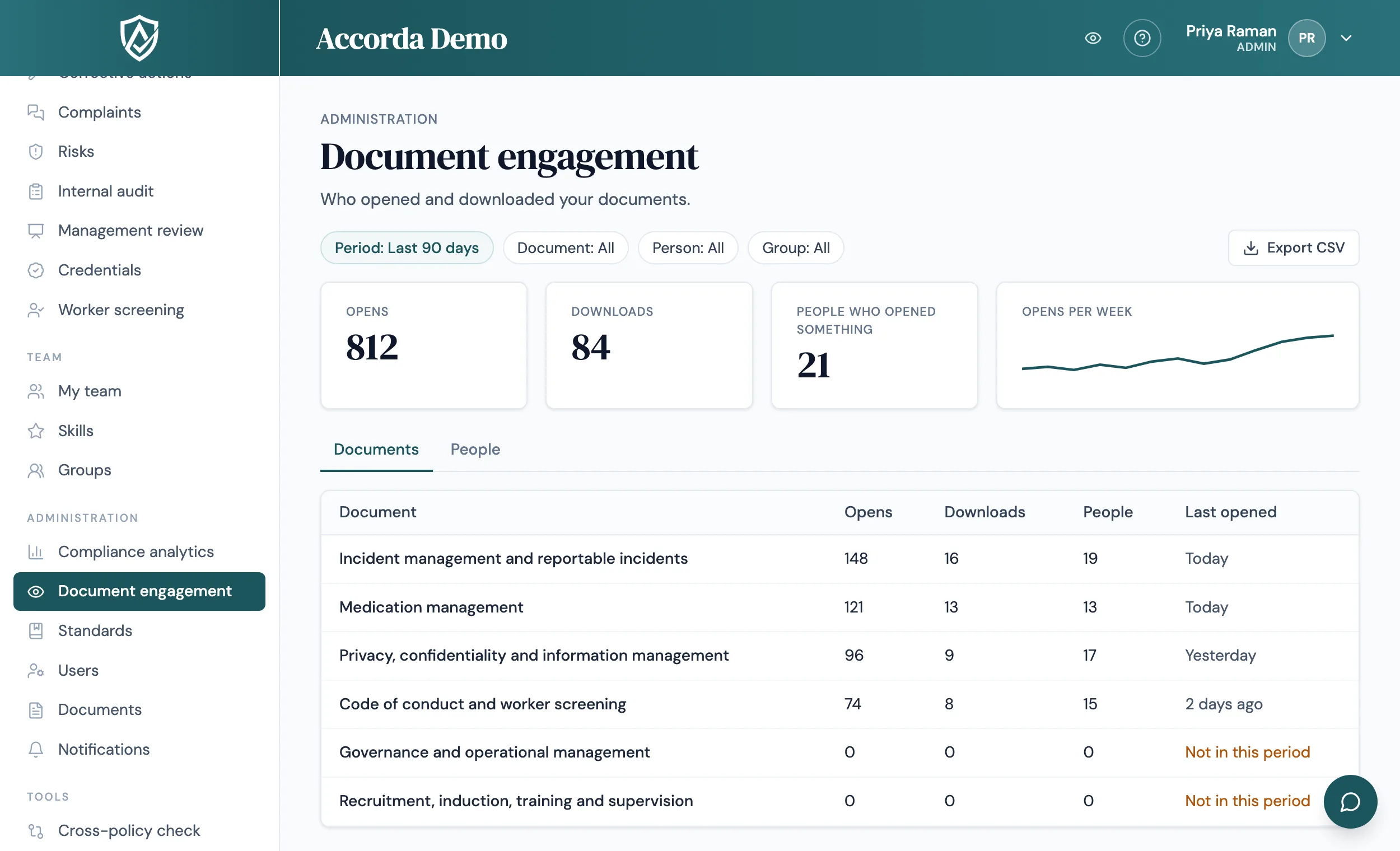
Document engagement shows who opened and downloaded which documents, and which documents nobody is opening at all. It stays off until you switch it on, and it is designed to be used openly, with staff told first.
14 days, every feature, no credit card.
Beyond the sign-off
A sign-off is the evidence that someone confirmed they read a policy, and it stays that way. Engagement answers a different question: are people going back to the procedures they rely on, and are new starters opening the documents waiting for their sign-off? It helps you spot a procedure nobody uses, or a team that has not opened the documents still waiting for its sign-off.
Two views: documents and people
Pick a period of 30 days, 90 days, 6 months or 12 months, and every figure on the page follows it.
- Documents: opens, people who opened it, downloads and when it was last opened, with the most and least opened and those nobody opened
- People: opens and downloads per person, and how many documents waiting for their sign-off they have not opened
- Filters by document, person, group, document type and standard
- Each person's opens and downloads in detail, with a 12-month history to download as CSV
Who can see it
Admins see everyone. A manager sees engagement only if an admin gives them permission, and then only for their own team and the groups they lead. Staff never see it, and external auditors' own opens are not recorded.
Privacy built in
Tracking is off by default; an admin switches on Document view tracking in Workspace settings. Tell your staff before you switch it on, as you would with any change in how their activity is recorded, and check your obligations under the privacy and workplace surveillance laws in your state.
- Opening the same document again within 30 minutes counts once
- Individual records are kept for two years, then only monthly totals per document remain
- Engagement is kept separate from sign-offs, compliance certificates and the evidence pack
FAQ
Straight answers.
Is tracking on by default?
No. An admin switches on Document view tracking in Workspace settings. Until then, nothing is recorded.
Does opening a document count as reading it?
No. It counts as an open. Signing off is still the evidence that someone read and accepted a policy.
Can managers see what their staff open?
Only if an admin gives them permission, and then only for their own team and the groups they lead.
How long are the records kept?
Individual opens and downloads are kept for two years. After that, only monthly totals per document remain.
Can we export the figures?
Yes. Each view exports to CSV for the filters you choose, and a person's full 12-month history downloads as a CSV.
Start today
Walk into your next audit ready.
Try Accorda free for 14 days. Every feature, no credit card.