
Feature · AI assistant
Ask in plain English. Get an answer from your own records.
The assistant sits on every page of Accorda. Ask how to do something, what your policies say or how you are tracking, and it answers from your own workspace. It only reads: it never changes a record or sends an email. AI suggests; people decide.
14 days, every feature, no credit card.
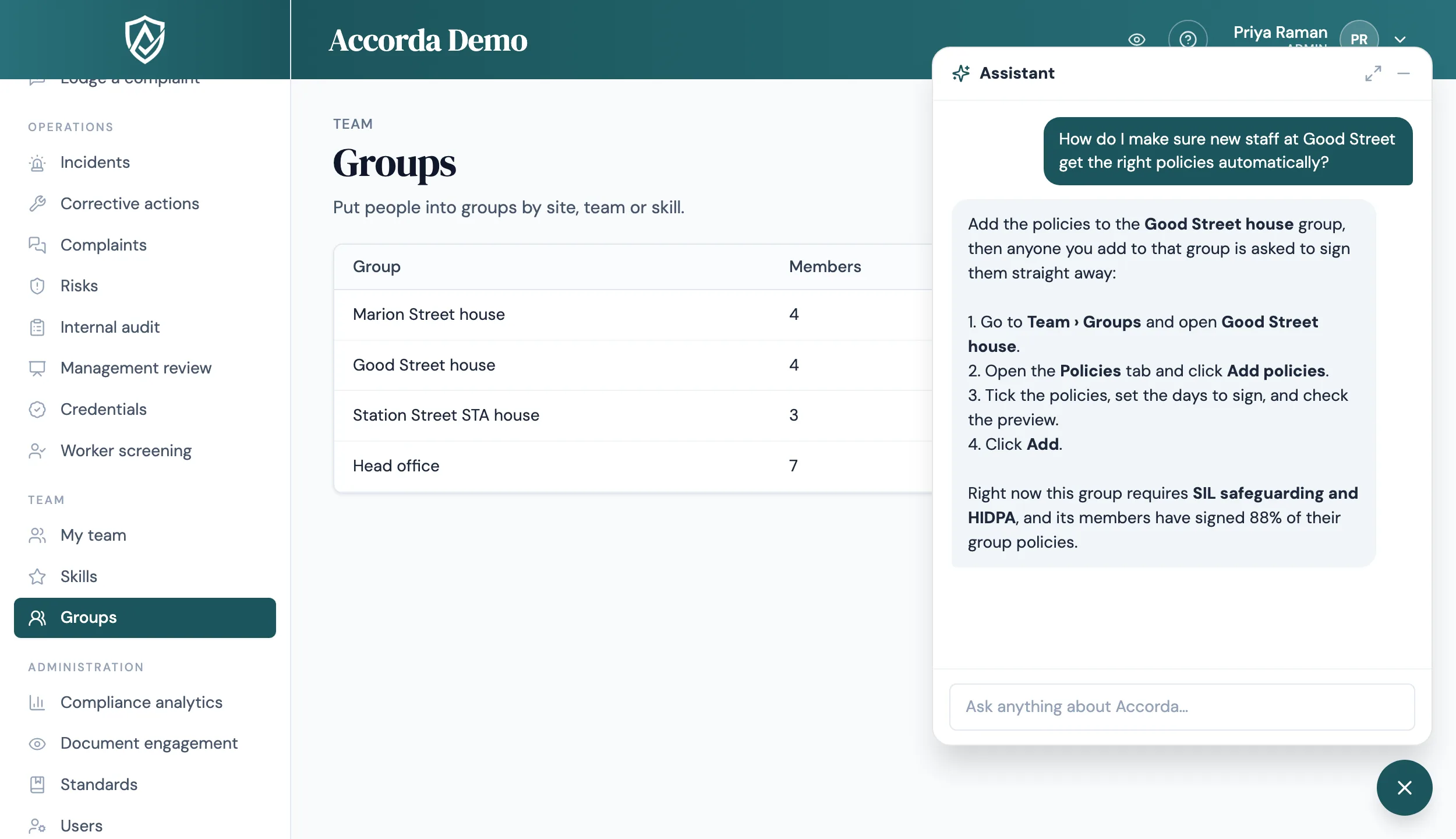
How-to answers, step by step
Ask "how do I set up a group?" or "where do I add a credential?" and the assistant walks you through it, using the names of the buttons and menus you will see. It knows which page you are on, so "how do I do this here?" works too.
Live figures for admins and managers
For admins and managers, the assistant answers from live, read-only data, so a question before a meeting gets a current answer rather than last month's report. Staff get answers about their own records, such as their own audits and quiz results.
- Who is overdue on sign-offs, and which policies are due for review
- Open incidents, corrective actions, complaints and risks
- Internal audits due or overdue
- Expiring credentials, skills gaps, compliance by group and progress by standard
- Quiz results
Your own policies, quoted
Ask what your own policy says about medication, privacy or incident reporting, and the assistant searches your published documents and quotes them. On the full assistant page, answers drawn from your policies list their source documents, with page numbers for PDFs. It only searches documents the person asking is allowed to see.
Permissions and switches respected
People only get answers about what their role and access allow, and features you have switched off are left out of answers entirely. The assistant never sees another organisation's data.
It is read-only by design. It cannot change settings, records or policies, invite users or send reminders. When asked to do something, it gives you the steps so you can do it yourself.
Today in a minute, and Suggest with AI
Admins see Today in a minute on the dashboard: a short note written by AI only from your own figures, covering what is going well and what needs attention, next to the few things worth doing first. It is a summary; the figures beside it are the record.
On each document, Suggest with AI fills in the details, ticking the standards, related documents and roles the document appears to fit. It only adds suggestions, never removes your choices, and nothing is saved until a person presses Save.
FAQ
Straight answers.
Can the assistant change our records?
No. It only reads. It cannot record incidents, edit policies, change settings or send emails. It tells you the steps instead.
Will staff see things they should not?
No. Answers follow each person's role and access, staff get their own records only, and features you have switched off are left out.
Where do its answers about our policies come from?
From your own published documents. Answers quote the document, and the full assistant page lists the sources, with page numbers for PDFs. A document that could not be indexed, such as a scanned image, cannot be searched.
Is Today in a minute accurate?
It is written only from your own figures, but it is a summary. The figures themselves are the record, and they are shown alongside it.
Does the AI make compliance decisions?
No. Across Accorda, AI drafts, summarises and suggests. A person reviews and decides, whether it is a reportable incident, a policy change or a quiz before it is published.
Start today
Walk into your next audit ready.
Try Accorda free for 14 days. Every feature, no credit card.