
Feature · Standards
Every standard, with the documents behind it.
One page that shows, for each standard you work to, the policies and procedures that support it and how far sign-offs have got. Standards a provider like you would usually have, with nothing linked yet, are listed too, so gaps are easy to spot.
14 days, every feature, no credit card.
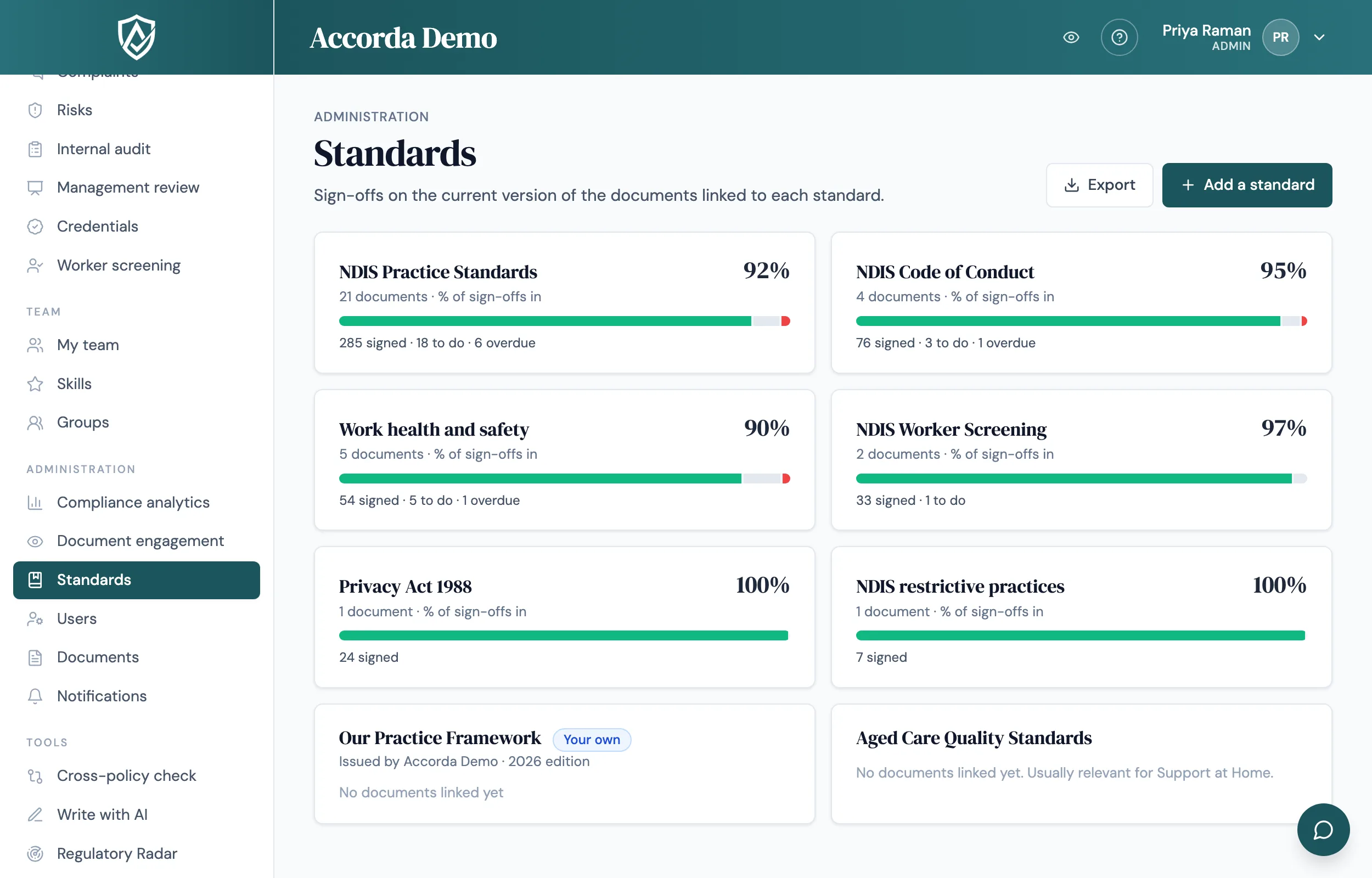
One view across the standards you answer to
Link each policy or procedure to the standards it supports, such as the NDIS Practice Standards, the Aged Care Quality Standards, the National Quality Framework, work health and safety or privacy. The Standards page then lists each standard with a sign-off bar: signed, still to do and overdue, counted on the current versions of the linked documents.
A note on what that figure means. The percentage measures sign-offs, not whether you meet the standard. Meeting a standard is a judgement for you and your auditor, and Accorda never claims otherwise.
A page for each standard
Open a standard to see, in one place, everything that bears on it:
- Each linked document, its review date, and who has not signed yet, with overdue names marked
- Quiz results on those documents, when quizzes are on
- Related incidents, complaints, risks and corrective actions
- Skills that require one of the documents, and internal audits run against the standard
- A CSV export for every list
Gaps you can see before an auditor does
From your compliance profile, Accorda lists the standards a provider like you would usually have, even before anything is linked to them. A standard marked "No documents linked yet" is a prompt to check whether a policy is missing or simply not linked.
Your own standards
Not everything you work to is in a built-in list. Add an internal framework, a funder's requirements or a peak body's code, with a name, an issuer and an edition. It gets its own page and works like a built-in standard: the same sign-off figure, document list, filters and CSVs, and its own sections in the evidence pack and the management review. Archive it when it no longer applies; existing links are kept.
Suggest with AI
Linking a large library by hand takes time. On any document, Suggest with AI reads it and ticks the standards, related documents and roles it appears to fit, including your own standards. It only adds ticks, never removes yours, and nothing is saved until a person presses Save.
Keeping the standards current
Standards and the rules behind them change. Regulatory Radar watches official regulator and government sources for your sector and state, and lists the policies an update may affect, so the documents behind each standard stay current. Requirements and their timing can change; confirm what applies to your service with your regulator.
Sources and references
The regulatory statements on this page rest on the official sources below. Requirements change; the regulator’s own site is the authority for your service.
Guides
Plain-English answers to the questions behind this page.
FAQ
Straight answers.
Does the percentage mean we comply with the standard?
No. It measures sign-offs on the current versions of the documents linked to that standard. Whether you meet a standard is a judgement for you and your auditor.
Which standards are built in?
Standards across NDIS, aged care, early childhood, work health and safety, privacy and consumer law, child safety, clinical practice, professional bodies and building, offered according to your compliance profile. You can add your own as well.
Can we add a funder's or peak body's requirements?
Yes. Add it as your own standard with a name, issuer and edition, then link documents to it. Suggest with AI will suggest your own standards too.
Do we have to link every document by hand?
No. Suggest with AI proposes links for each document, and documents that have had an AI policy review can start with the review's suggested standards ticked. You check them and save.
Who can see the Standards page?
Admins and managers, and external auditors read-only. Adding your own standards needs permission to manage documents, which admins have by default.
Start today
Walk into your next audit ready.
Try Accorda free for 14 days. Every feature, no credit card.